> For the complete documentation index, see [llms.txt](https://rez-notify-me.gitbook.io/rez-notify-me/llms.txt). Markdown versions of documentation pages are available by appending `.md` to page URLs; this page is available as [Markdown](https://rez-notify-me.gitbook.io/rez-notify-me/preorder/managing-partial-payments-in-shopify.md).

# Managing partial payments in Shopify

The REZ Preorder app lets you control how customers pay for preorder items. Either in full or with a partial payment (deposit). This guide explains how payments work, how orders appear in Shopify

### Payment Options in Essential Preorder

You can choose between two payment options for preorders:

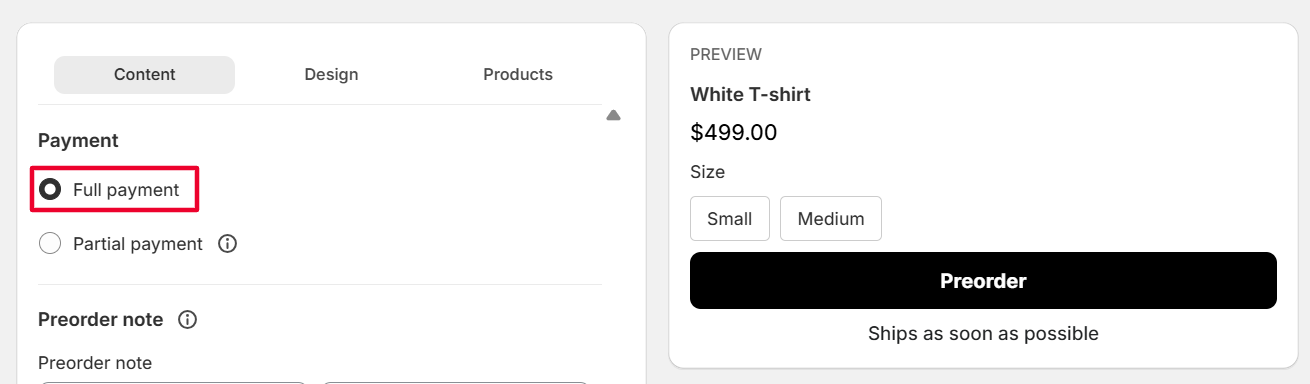
#### 1️⃣ Full Payment

<figure><img src="https://694306685-files.gitbook.io/~/files/v0/b/gitbook-x-prod.appspot.com/o/spaces%2FRQjauhlFJIllaMdenmZk%2Fuploads%2Fj18PnIPKjpZDHTLecFh5%2Fimage.png?alt=media&amp;token=d6be82c3-5974-429c-bf28-5a20b4209cd5" alt=""><figcaption></figcaption></figure>

**Best for:** standard preorders with immediate payment

* Customers pay **100% of the order amount at checkout**
* Order is marked as **Paid** in Shopify
* ✅ **Shopify Payments is NOT required**

***

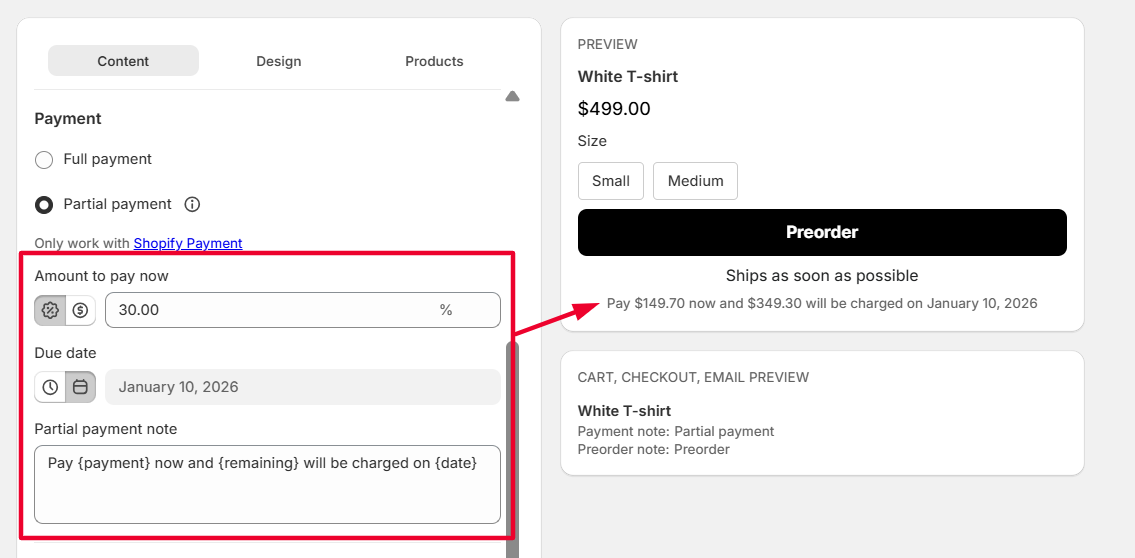
#### 2️⃣ Partial Payment (Deposit)

**Best for:** high-value items or long production times

* Customers pay a **downpayment** at checkout
* Remaining balance is collected **manually** in Shopify admin

You can choose how much to collect upfront (**a percentage or a fixed amount**) and set a **date to collect the remaining balance later**.

<figure><img src="https://694306685-files.gitbook.io/~/files/v0/b/gitbook-x-prod.appspot.com/o/spaces%2FRQjauhlFJIllaMdenmZk%2Fuploads%2Fp1o0a4NDc5injk7NAxRM%2Fimage.png?alt=media&amp;token=4440a80f-14c8-40b3-860a-011f1d60853c" alt=""><figcaption></figcaption></figure>

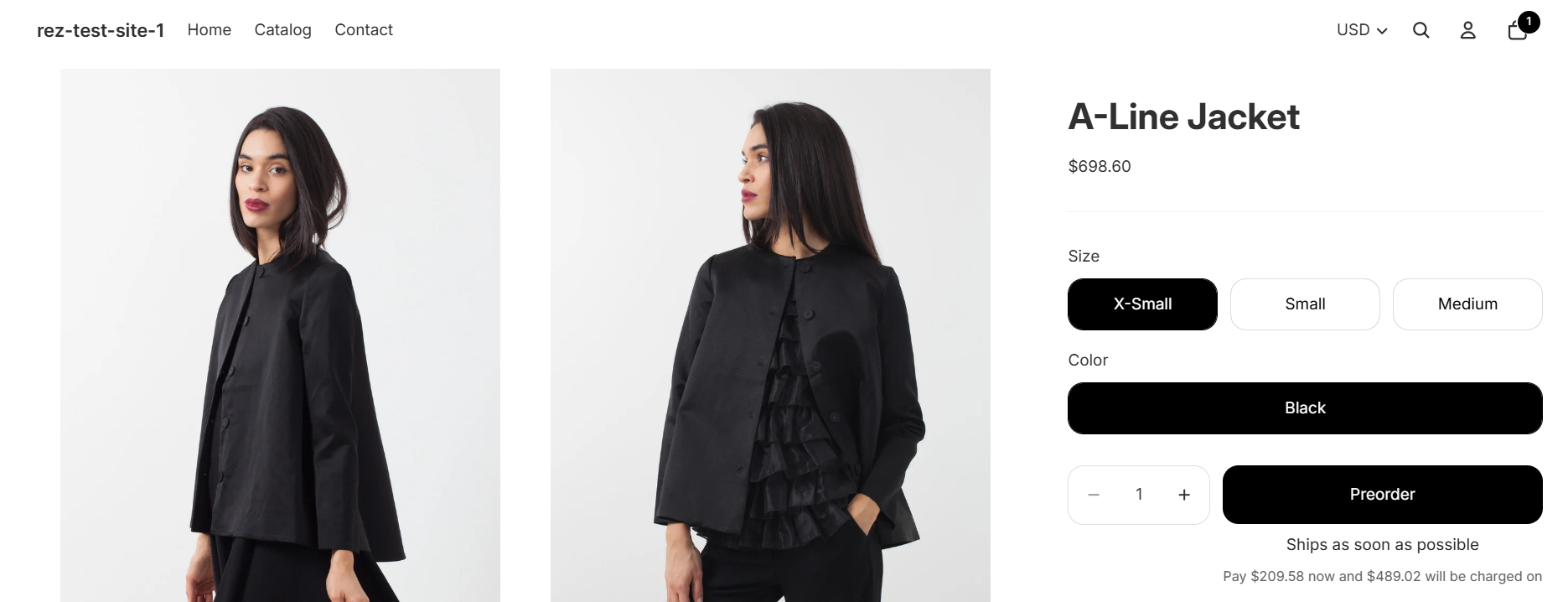
Here is what customer will see on product page:

<figure><img src="https://694306685-files.gitbook.io/~/files/v0/b/gitbook-x-prod.appspot.com/o/spaces%2FRQjauhlFJIllaMdenmZk%2Fuploads%2FAk6o6Km2IQ9P0FEXTAKA%2Fimage.png?alt=media&amp;token=7dfc3aa1-3f15-46ef-bd1a-c5b3bc3557e3" alt=""><figcaption></figcaption></figure>

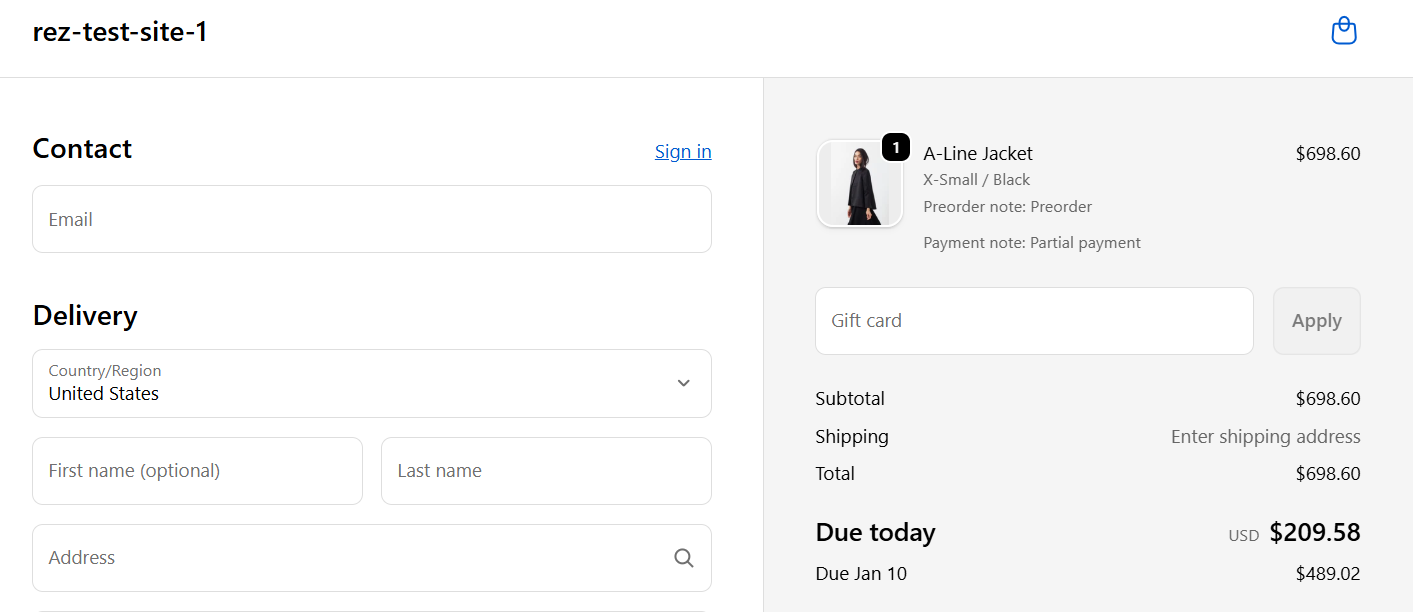
Customer see on checkout page:

<figure><img src="https://694306685-files.gitbook.io/~/files/v0/b/gitbook-x-prod.appspot.com/o/spaces%2FRQjauhlFJIllaMdenmZk%2Fuploads%2FNbeSiB0BVZ6VDZcNhq1u%2Fimage.png?alt=media&amp;token=cf3556e7-be96-41ba-808c-8e13603998ec" alt=""><figcaption></figcaption></figure>

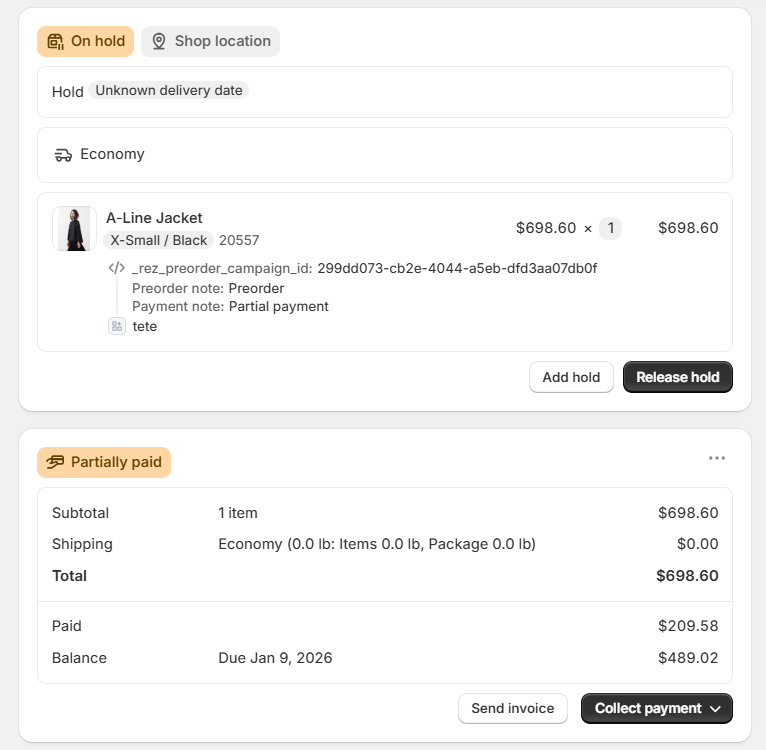
After customers check out (they paid a downpayment), here is what you see on orders:

* Order is marked as **Partially Paid**

<figure><img src="https://694306685-files.gitbook.io/~/files/v0/b/gitbook-x-prod.appspot.com/o/spaces%2FRQjauhlFJIllaMdenmZk%2Fuploads%2FvM7QO12aaQ3UN6PGpPrH%2Fimage.png?alt=media&amp;token=242bd272-b94f-43c1-8cdb-7131ccaa43ef" alt=""><figcaption></figcaption></figure>

<figure><img src="https://694306685-files.gitbook.io/~/files/v0/b/gitbook-x-prod.appspot.com/o/spaces%2FRQjauhlFJIllaMdenmZk%2Fuploads%2FTTUisx4MD5UPYHjepEa3%2Fimage.png?alt=media&amp;token=cbeb1af3-53da-4a5a-a220-f5cd3c8453c9" alt=""><figcaption></figcaption></figure>

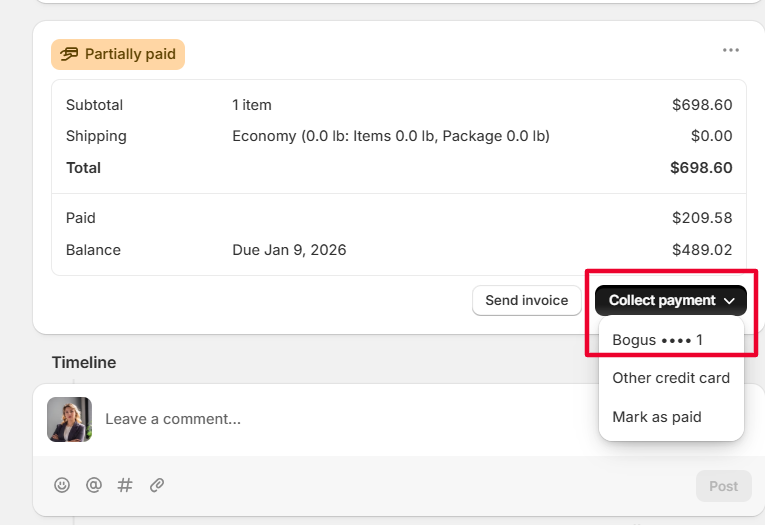
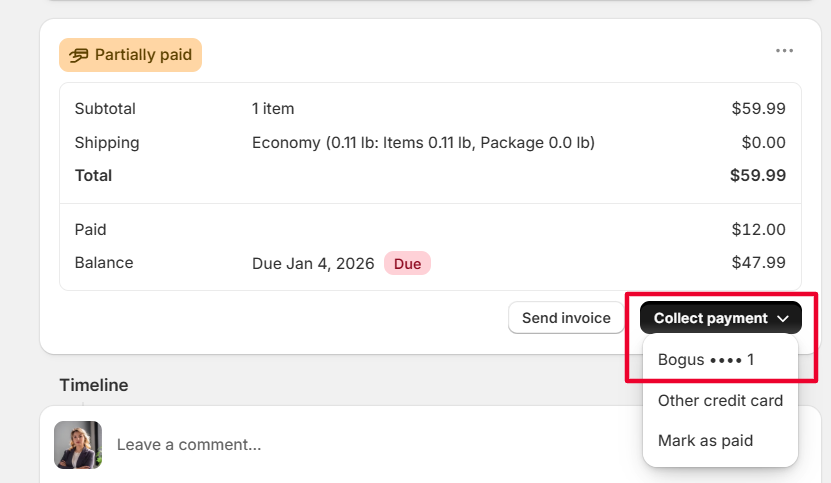
You can then collect remaining balance **manually** in Shopify admin:

<figure><img src="https://694306685-files.gitbook.io/~/files/v0/b/gitbook-x-prod.appspot.com/o/spaces%2FRQjauhlFJIllaMdenmZk%2Fuploads%2FdJq1mMCiX51SpIfD1j2b%2Fimage.png?alt=media&amp;token=7f85720a-b701-4478-a0c7-ba0b57a27064" alt=""><figcaption></figcaption></figure>

**Key settings & notes**

* Downpayment can be set to **0** (reserve now, pay later)
* You can set **different deposit amounts** by creating multiple campaigns
* ✅ **Shopify Payments is REQUIRED**
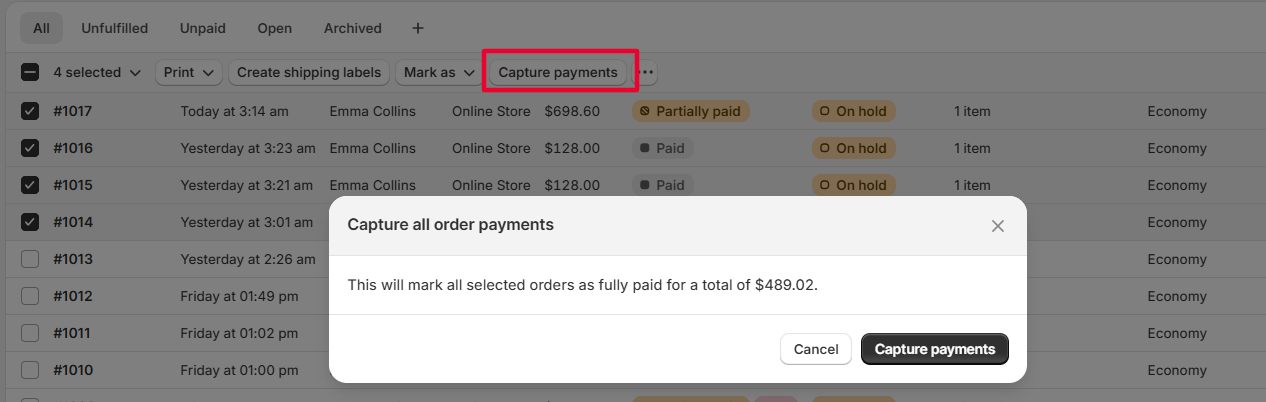
* ⚠️ **Do NOT use Shopify’s bulk “Capture payment”**
  * This does **not** charge customers
  * It only marks orders as paid (known Shopify issue)

<figure><img src="https://694306685-files.gitbook.io/~/files/v0/b/gitbook-x-prod.appspot.com/o/spaces%2FRQjauhlFJIllaMdenmZk%2Fuploads%2Famnu1SKiwU9r5qCxtZbz%2Fimage.png?alt=media&amp;token=e7b3828f-37ce-4fb7-9674-2bb52da6b6e7" alt=""><figcaption></figcaption></figure>

***

### Orders & Payment Status in Shopify

How orders appear in the Shopify dashboard

| Payment Option              | Order Status       |
| --------------------------- | ------------------ |
| Full Payment                | **Paid**           |
| Partial Payment             | **Partially Paid** |
| Partial Payment (0 deposit) | **Partially Paid** |

🔔 **Important**

* You must collect the **remaining balance manually** from the order detail page
* This can be done **on the due date or anytime before/after**

<figure><img src="https://694306685-files.gitbook.io/~/files/v0/b/gitbook-x-prod.appspot.com/o/spaces%2FRQjauhlFJIllaMdenmZk%2Fuploads%2FQNX0qPXtnS3SKuacxF87%2Fimage.png?alt=media&amp;token=a4c669ca-6704-4917-b838-21b5c435997b" alt=""><figcaption></figcaption></figure>

***

### Fulfillment Best Practices (Deposits Only)

Shopify does **not block fulfillment** for unpaid balances. We recommend:

* Checking **payment status** before fulfilling
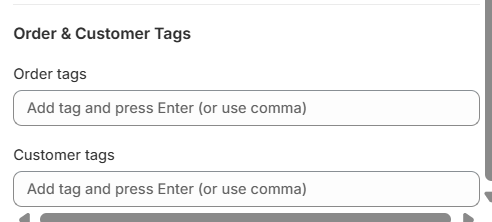
* Adding **order tags**, such as:
  * `Deposit Paid`
  * `Balance Due`

<figure><img src="https://694306685-files.gitbook.io/~/files/v0/b/gitbook-x-prod.appspot.com/o/spaces%2FRQjauhlFJIllaMdenmZk%2Fuploads%2Fp3V5N0Ir3VkRsSPbNO9E%2Fimage.png?alt=media&amp;token=4cbb7694-0a47-4dea-af96-2072c2f1a6df" alt=""><figcaption></figcaption></figure>

* Holding fulfillment until the order is **fully paid**, if required

***

### Refunds & Cancellations

**Refunds for partial payments**

* You can refund:
  * Only the deposit
  * Or the full collected amount
* Shopify allows you to cancel any remaining unpaid balance

**Non-refundable deposits**

* Shopify does **not enforce** non-refundable deposits
* If needed, clearly state this in:
  * Product descriptions
  * Preorder terms
  * Store policies

**Order cancellations**

* Customers can cancel preorder items **before fulfillment**
* This helps maintain transparency and trust

***

### Reporting & Tracking

**Track payment status**

Use Shopify’s **Orders dashboard** filters:

* **Partially Paid** → deposit collected, balance pending
* **Paid** → full amount collected

Adding order tags can make tracking easier.

**Reporting on partial payments**

Shopify doesn’t offer a dedicated partial payment report, but you can:

* Export orders to **CSV** and filter by payment status
* Use **Shopify Analytics** to track preorder revenue and trends

***

### Summary

* Full payment = simple, immediate charge
* Partial payment = flexible, manual balance collection
* Shopify Payments is required for deposits
* Manual tracking is essential for fulfilment and follow-ups